
Thursday, September 23, 2010

Reflection Essay
I wanted to really get the least important done after all the important stuff was done, but it was just not happening. I think I've lost my creativity...my touch. Or something, I don't feel as inspired anymore and it really shows in my level, at least in some parts of it, some other parts I had fun doing like making the puzzles, texturing the pillars in the Crimson room. Some things were fun, others were just a headache. But I keep moving forward seeing if I can push myself to my limits, but I fear the things that are going wrong are just simple fixes that I cant see. I really feel I can do better.
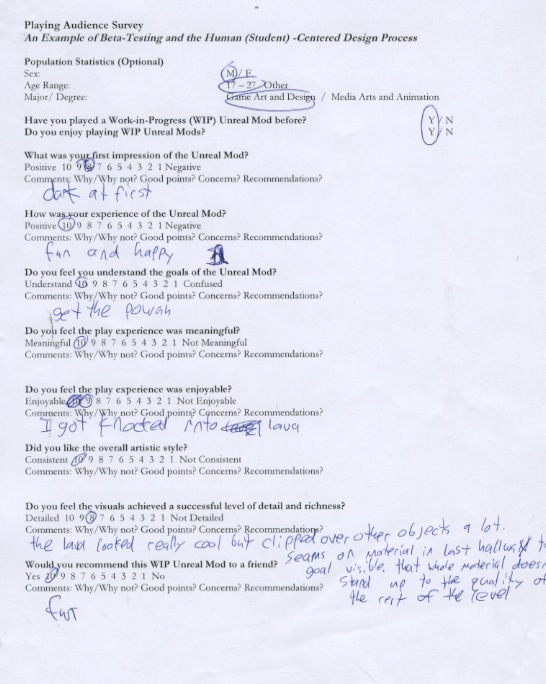
I've gotten lots of great feedback from my peers. Mostly good things that they liked, some of the things that they wanted me to fix I either wasn't too sure how or I just didn't want to because it was a part of how I wanted it to look. For example, the Black Room (first room you start out in) a few said that it was too dark, but that is why its called the Black Room, I wanted the player to start out in a dark space and see if they can find their way out with the small amount of light leading the way. I forgot to put the window light in the room so that may be what it needs. I now know how to apply a window light easy without actual lights.
I fixed the collision problem so hopefully it all works out well. I guess I was having some issues with my Indigo Room boxes, where the collision would be on the bottom of the box but not all the way around. It was kind of annoying but all the headache turned out to be a simple overlooked issue; I was updating the wrong package. It seems I had two different packages in the same place and they both had the same name so when I updated in one it wouldn't show because it wasn't the right one, confusing yes, but its all ok now. Even though I could not get the Indigo Room's puzzles working I was able to (with lots of help from a friend that graduated) re work my puzzle so that it was simple and made sense. He even told me how to attach it to my camera so once I was done with the puzzle it would cut to the camera animation.
I've learned a lot in this class, and I now know the limitations of what I can do in Unreal. I know I started out thinking really big and to me that was thinking small, but after hearing everyone say that it would be almost impossible to do everything that I wanted in the time that I have I tried really hard to cut it down to the bare minimum. Good thing too because I think I would have killed myself trying to do four puzzles as complicated as they were. Even though my room and level are considered “complete” there is still things I would like to add. For instance I worked so hard trying to get the puzzles working that I didn't have time to input the story into the level the way I wanted. Even though I didn't have much of a story to begin with. For some reason I couldn't focus on the story in this class even though it was extremely important.
The way all the rooms are textured (save the Crimson Room) bothers me still but I can't put more into this then I already have right now. It will have to wait til another time when I have the time to dedicate to even more things and fun possibilities.
Sunday, September 19, 2010


Journal 8
My first approach was listing everything that needed to be done in my level, fixing and more texturing and what not. I put that all in a list and went down it from most important to least. Going through it the most important was giving me enough trouble and I still wanted to finish the least important. I was able to get the puzzles working, both of them, everything works, its just i'm missing key elements that I cannot do at the moment because of time (and poor time management on my part, I have only myself to blame). Most of the headache from this project was trying to remember how to do certain things that I wanted. Like how to texture something a certain way. Or how to make something look right.


Mesh List: Complete
| Orb of Reflection | ||||||||
| Tiffany Minsal | Finished | Finished | Finished | Finished | Finished | Finished | ||
| Original Mesh Placeholder Name | Mesh Name | Modeled | Uv'd | Textured | Imported | Placed | Shaders | |
| Necessary for Gameplay: | ||||||||
| Platform | Platform | yes | yes | yes | yes | yes | ||
| Window | Window | yes | yes | yes | yes | yes | ||
| Door | Door | yes | yes | yes | yes | yes | ||
| Platform | Box | yes | yes | yes | yes | yes | ||
| Critical to Story/ History: | ||||||||
| Treasure | Orb | yes | yes | yes | yes | yes | ||
| Buttress | N/A | N/A | N/A | N/A | N/A | N/A | ||
| Tree | Lava Pillar | yes | yes | yes | yes | yes | ||
| Balastrade | Glass Pillar | yes | yes | yes | yes | yes | ||
| Decoration: | ||||||||
| Plant Pile | Bush | yes | yes | yes | yes | yes | ||
| Doorway | Doorway | yes | yes | yes | yes | yes | ||
| Arch | Arch | yes | yes | yes | yes | yes | ||
| Column | Column | yes | yes | yes | yes | yes | ||
| Obelisk | Pot | yes | yes | yes | yes | yes | ||
| Beam | Ceiling Torch | yes | yes | yes | yes | yes | ||
| Plinth | Flower | yes | yes | yes | yes | yes | ||
| Switch | Wall Torch | yes | yes | yes | yes | yes |
Journal 7
Wow I realize that I should have been unwrapping and texturing a lot more when I started unwrapping my models. Its been so long, I havent unwrapped since character modeling class. Getting the hang of it took a little bit but I found my way around and remembered some things. I also followed the tutorial provided on the class website and it was a good refresher. I'm still having a lot of trouble unwrapping though, I cant seem to get it the way I want to. I come really close, but in some places the texture stretches and when I try and fix it, I mess up something else. I kept having to stop myself from getting to sucked into texturing because it was taking way too long to texture just one object because I wanted to get it looking just right. I've had to bit my tongue and move on even though I didnt want to due to lack of time. Actually it wasnt even lack of time, it was the fact that life just likes to get in the way at the wrong time.
Mesh List: WIP 2
| Orb of Reflection | |||||
| Tiffany Minsal | Finished | Finished | Finished | ||
| Original Mesh Placeholder Name | Mesh Name | Modeled | Uv'd | Textured | |
| Necessary for Gameplay: | |||||
| Platform | Platform | yes | yes | yes | |
| Window | Window | yes | yes | yes | |
| Door | Door | yes | yes | yes | |
| Platform | Box | yes | yes | yes | |
| Critical to Story/ History: | |||||
| Treasure | Orb | yes | yes | yes | |
| Buttress | N/A | N/A | N/A | N/A | |
| Tree | Lava Pillar | yes | yes | yes | |
| Balastrade | Glass Pillar | yes | yes | yes | |
| Decoration: | |||||
| Plant Pile | Bush | yes | yes | yes | |
| Doorway | Doorway | yes | yes | yes | |
| Arch | Arch | yes | yes | yes | |
| Column | Column | yes | yes | yes | |
| Obelisk | Pot | yes | yes | yes | |
| Beam | Ceiling Torch | yes | yes | yes | |
| Plinth | Flower | yes | yes | yes | |
| Switch | Wall Torch | yes | yes | yes |


Journal 6
Modeling the objects were pretty simple. I got through it pretty quickly with little trouble and they all imported just fine. Actually modeling the objects was a lot easier then coming up with concept art for them, I would have some mess ups or I would do something that I didnt intend to do and it would actually turn out better then what I originally wanted. Or I would get these shapes that looked interesting for where I wanted my object. Originally I had no idea what I wanted my obelisk to be replaced by, but I was developing some potential assets before, and I know I wanted some kind of pot. Splines were the best way to approach a few of my models.


Mesh List: WIP 1
| Orb of Reflection | ||
| Tiffany Minsal | ||
| Original Mesh Placeholder Name | Mesh Name | |
| Necessary for Gameplay: | ||
| Platform | Platform | |
| Window | Window | |
| Door | Door | |
| Platform | Box | |
| Critical to Story/ History: | ||
| Treasure | Orb | |
| Buttress | N/A | |
| Tree | Lava Pillar | |
| Balastrade | Glass Pillar | |
| Decoration: | ||
| Plant Pile | Bush | |
| Doorway | Doorway | |
| Arch | Arch | |
| Column | Column | |
| Obelisk | Pot | |
| Beam | Ceiling Torch | |
| Plinth | Flower | |
| Switch | Wall Torch |
Journal 5
The first thing I did for myself was take screen shots of my level for a reference for painting. Then I did some research for inspiration to what kind of assets I could use for the Crimson level to start. I developed some sketches of potential assets in my sketchbook to get some ideas flowing. Then I did a lot of texture research from Legend of Zelda: Majora's Mask to see how I should develop a certain feel for my level and how vibrant of colors I should use. I saved a few images for reference.
When attempting my sketch of the Crimson Room, I first set up layers for organization. Then I realized that I could use the clouds filter to get a simple and quick lava effect. Not one that i'll texture but just for the sake of this sketch i'll use it (since I need some practice on lava). I really had some fun making the pillars, I wanted them to have this glowy swirl affect like instead of regular cracks it would be swirly cracks that show the lava through the rocks (I like swirls). Overall I think my “sketch” looks pretty cheesy, I spent more time on it then needed and photoshop still frustrates me, but I think maybe one day we will develop a mutual friendship, for now...it likes to bicker with me every now and again.
Journal 4
I'm mostly having a lot of trouble trying to get my box puzzle in the Indigo Room to work the way I want it. I was shown one way but I was unable to execute it properly. I was able to get some help, my friend's method was a lot simpler, and worked, to a certain extent, I was able to move the boxes but I was unable to figure out a method to make them go in their desired spots and open the door. I also needed the carpet to be textured so the player could figure out where to assemble the boxes. After hours and hours of thinking and searching for some way, I finally gave up. I just left the boxes movable but the player doesnt need to move them to open the door. That will come later. For now the boxes do not play a part in this level. I got a lot of help from a fellow classmate on how to add “kill volume” and “lava volume”, which was really simple, and it is something I should have already known, but I didn't. I had a couple of people test out my game, gave me some feedback that was useful and I took it.


Journal 3
UDK is still very new to me, granted I've gotten use to some of the tools in it already and I am quit proud of myself, but I know I can learn more and do better. With my level I'm using the subtractive space to start off. I forgot right off the bat how to “edit vertices” in UDK. I don't remember what I learned to shape the boxes how I want them. I asked around for help from students that already took the class and that I know are quit familiar with the engine. All but one of who I asked said that they couldn't help me. Maybe its because I worded it wrong? I'm not sure, but the one who said that could help me said that we could meet up. Unfortunately it was a couple days before class started. I took the opportunity to finish all of my other homework so I can concentrate on Level Design for the remaining days that I would be getting help. Something happened, my help didn't come through, said that they needed to take care of some things and couldn't be there to help. I didn't know what else to do, so I went back to my file and started messing around with the engine to see if I could remember something. Another thing I could not recall was how to make a door and a pathway. I was struggling intensely, and I finally asked someone that I asked for help previously to please help me because it was already too late to email my teacher. He sat down with me with the only hour of free time he had and explained to me how to approach my level, but it was completely different with how I was taught. It was a lot more messy, but I was able to do what I wanted in some form. I decided that this would be what I show to my instructor, but I'm also going to ask how to approach this better and see if I can redo the entire level. I don't mind it really, I would rather redo it then have tons of stuff that I don't need. As I see it, its just another step in the learning process. I have to keep going and going in order to learn from my mistakes. At least now I know how to do it a different way.


Journal 2
The paper prototype project was an experience, it was pretty fun trying to make my level into paper form. After the experience of the paper prototype I learned that I had to fix some things and add some things. I first decided to figure out a way to make my level more interesting then just a straight shot box room. I experimented with different shapes and tried to play around with what would work for my level. It took me a while to get back into the groove of Illustrator, but I eventually got the hang of it a bit. I switched my rooms up, this time the Crimson room is first and then the Indigo is second; since I was told that it should start off easy and get harder. I also added stairs, so now my level goes up and down.
Subscribe to:
Posts (Atom)